The short answer
- Job costing means giving every sale and every cost the job, property or client it belongs to, so each one gets its own small profit and loss.
- Your total profit can look fine while one job or one property loses money. Only a per-job view shows which one, and a weekly look catches it while there is still time to act.
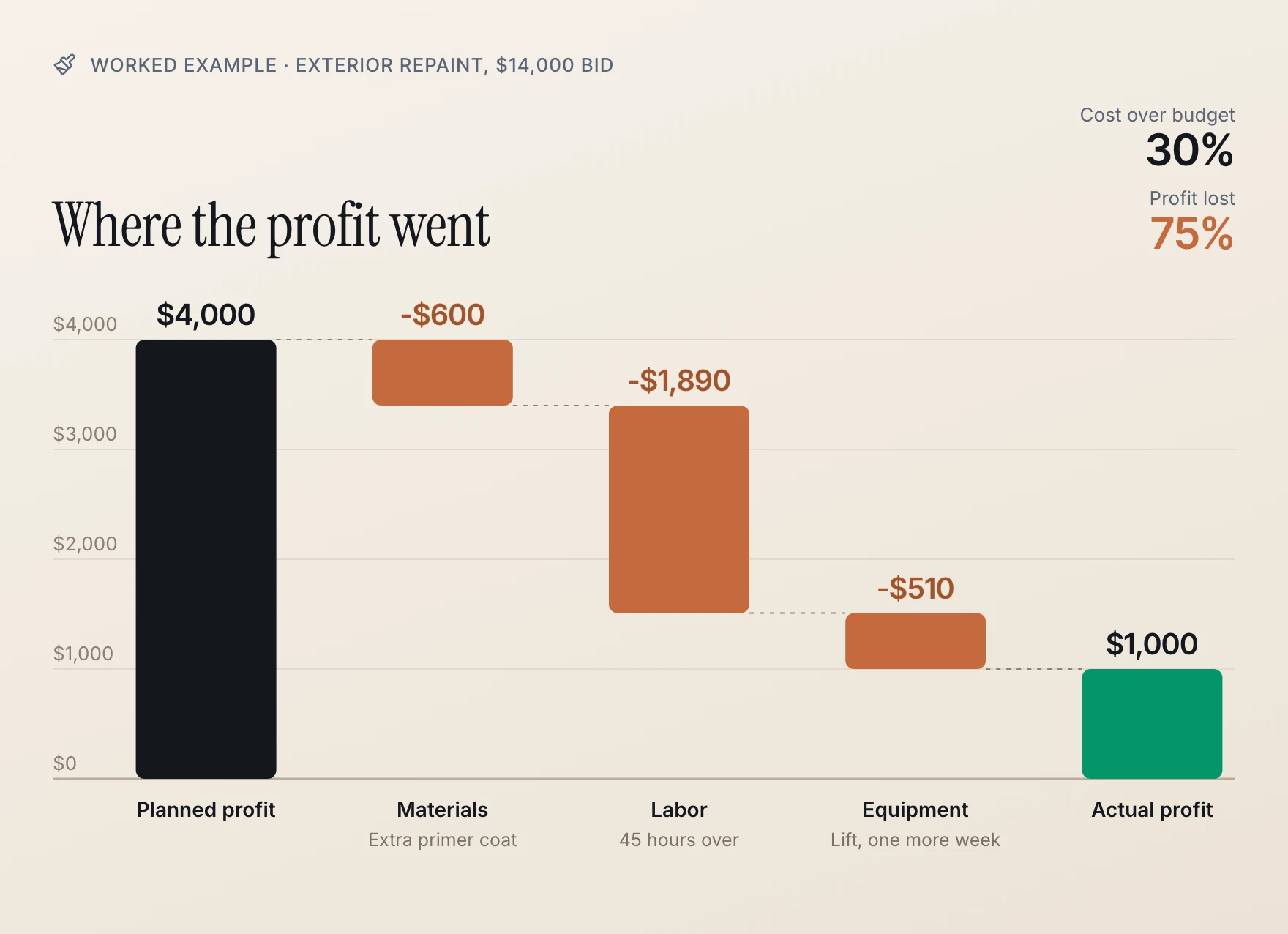
- On a $14,000 paint job budgeted at $10,000 of cost, $3,000 of overruns on paint, labor and a lift rental cut the profit from $4,000 to $1,000. Costs ran 30% over; the profit fell 75%.
- Track three things per job: materials, labor (in dollars and in hours) and everything else, against a budget you set before work starts. Then close each job out and compare.

What job costing is
Most small business books answer one question: did the business make money this year? Job costing answers a sharper one: which work made the money, and which work quietly lost it?
The idea is simple. Every sale and every cost gets a label for the job, property or client it belongs to. A gallon of primer goes to the Garcia repaint. A water heater goes to the duplex on Oak Street. Ten hours of design work go to one client's account. Add up each label and every job has its own small profit and loss.
Who this is for:
- Painters and general contractors, where each job is bid once and either earns its margin or doesn't.
- House flippers, where each property is a project with a purchase, a rehab budget and a sale.
- Landlords, where each property should pay for itself.
- Service businesses that bill by client, where one demanding account can eat the profit the others make.
The problem it solves: your bank balance and your total profit are averages. A good job hides a bad one, and a full house of tenants hides the one property that costs more than it brings in.
Why overruns wipe out the profit

Here is the worked example. A painting company bids an exterior repaint at $14,000. Behind the bid: paint, primer and caulk, 160 hours of labor at $42 an hour, and a lift rental.
| Cost | Budget | Actual | Over |
|---|---|---|---|
| Materials | $2,600 | $3,200 | $600 |
| Labor | $6,720 | $8,610 | $1,890 |
| Equipment | $680 | $1,190 | $510 |
| Total | $10,000 | $13,000 | $3,000 |
| Profit | $4,000 | $1,000 |
Nothing dramatic happened. The bare siding needed an extra primer coat, the crew worked 45 more hours than planned (45 × $42 = $1,890), and the lift stayed an extra week. Each overrun looked small on its own.
Together they turned a 28.6% margin into 7.1%. Costs ran 30% over budget, and the profit fell 75%. That is the arithmetic every trade lives with: profit is the thin slice left after cost, so a small percentage miss on cost is a large percentage miss on profit.
Without job costing, this job just disappears into the year. The total for the year still shows a profit, the next exterior is bid at the same price, and the same 45 hours get lost again.
The overrun you can fix is the one you see while the job is still running. A job you only review at tax time is a job you already paid for.
How to job cost well, in any system
You can do this in a spreadsheet, in accounting software or on paper. The method is the same.
1. Set the budget before work starts. Break the price into cost types: materials, labor, subcontractors, equipment and other. Your estimate already holds these numbers, so keep it. A job with no budget can only tell you what happened, never whether that was good.
2. Label every cost the day it happens. Each receipt, bill and card charge gets its job. A forgotten bill makes the job look better than it was, and you will price the next one on that wrong number. The supply house receipt in the truck is the one that goes missing, so label it at the counter or snap it before you leave.
3. Track labor in hours as well as dollars. Hours are what you actually estimate, and they are where jobs often run over. Have each person record hours per job, every day, not reconstructed on Friday from memory.

4. Count the costs that don't feel like the job. Dump fees, permits, a rented lift, mileage to the site, the subcontractor who came back to fix something. These are real job costs, and they often end up in general overhead instead.
5. Check the job weekly while it runs. Compare cost so far against the budget, by type. If labor hours are at 80% of the budget and the job is half done, you know now, while you can still talk to the customer about a change order.
6. Close it out and compare. When the job ends, write down three numbers: what you bid, what it cost and what you made. Then look at the biggest overrun and change the next estimate. This step is the whole point; the rest is how you earn it.
House flippers: one property, every dollar

A flip is one long job. Label everything to the property: the purchase and closing costs, every rehab bill, and the costs of holding it (loan interest, property tax, insurance, utilities) for every month it sits. Then the selling costs.
Holding and selling costs are where a flip's profit quietly shrinks. A house bought for $180,000 with $52,300 of rehab and sold for $268,000 looks like $35,700 of profit. Add five months of holding costs ($6,900) and commissions and closing costs on the sale ($17,100), and the real profit is $11,700. Much of what you spend on a flip becomes part of what the house cost you, so a complete per-property record is also exactly what your accountant needs when it sells.
Landlords: each property pays its own way

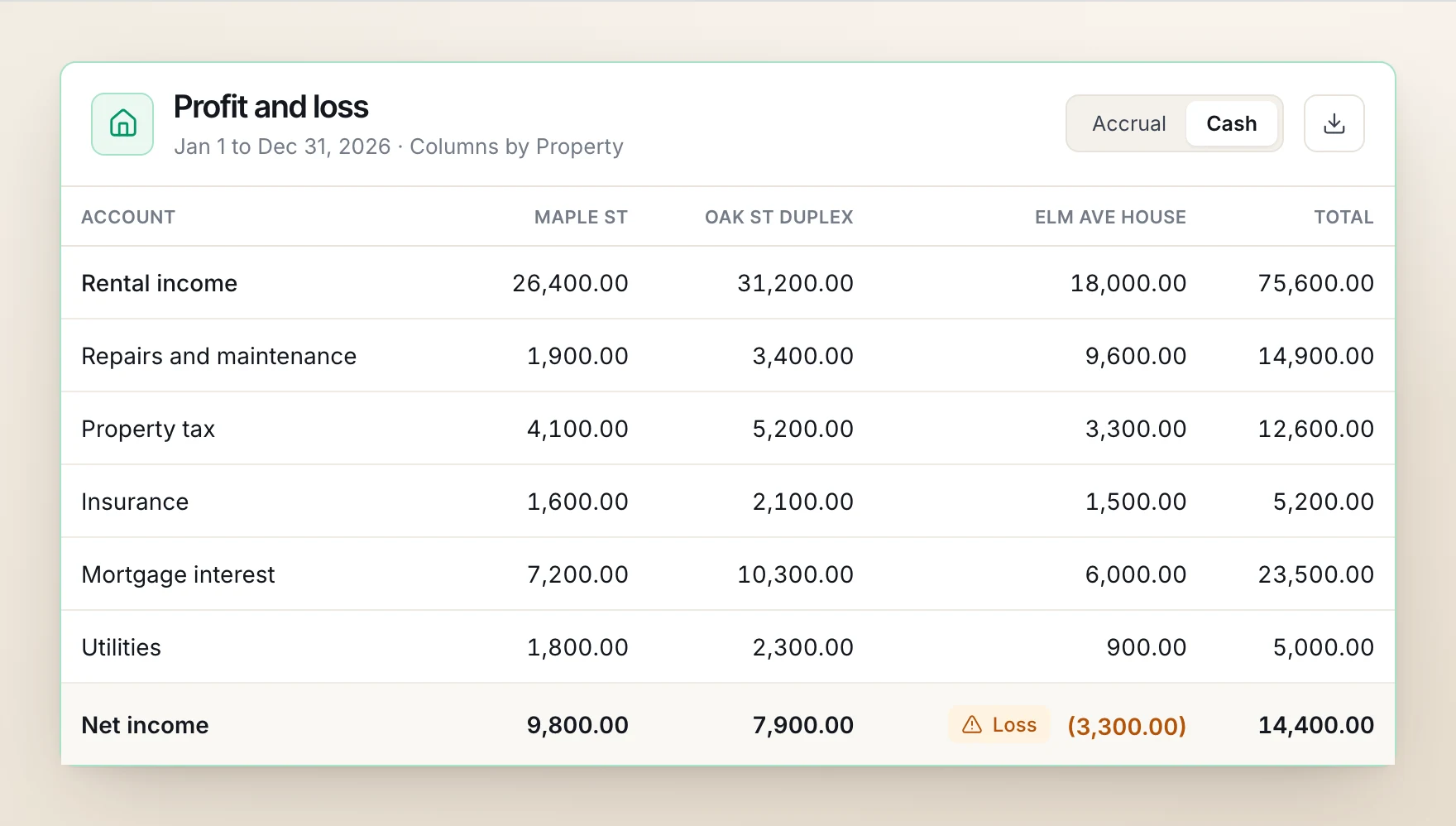
For rentals the "job" never ends, so the question is per property, per year. Give every rent payment, repair, tax bill and insurance premium its property. A portfolio that nets $14,400 can be two good houses carrying a third that lost $3,300 to a vacancy and a roof repair.
The IRS already thinks this way. Schedule E reports income and expenses in a separate column for each rental property, and a landlord with more than three attaches more pages. Books kept per property all year turn that form into copying numbers instead of sorting a year of receipts in April.
How to do it in BooksGPT
Everything below is in the product today.
Class tracking for properties, crews and clients (every plan)
In BooksGPT, classes are called dimensions, and you name them: Class, Property, Location or Client. Each value is one property, crew or client.
- Tag the money that moves through your bank and bills: bank transactions one at a time or in bulk, bill lines, and journal lines. That covers rent deposited per property and every cost.
- Let it fill itself in: give a property's own checking account its class, and its new transactions take that property when they post. A rule or a category's default class can fill it too, and the class you pick by hand always wins.
- Read it: Profit & Loss shows one column per value, so each property's net is one glance.
- Know the limit: invoices carry no class. If you bill a job or a client by invoice, put those invoices on a project (below) to see that income per job.
Projects for jobs with a budget (Business Max add-on)
For painters, contractors and flippers, a project is a job with a customer, a status and a job number, and it carries the rest of the method:
- Put the project on everything: estimates, invoices (a different job per line if you need it), bills and their lines, purchase orders, bank transactions and journal entries. Each cost takes a cost type: Materials, Labor, Subcontractors, Equipment or Other, plus your own cost codes if you use them.
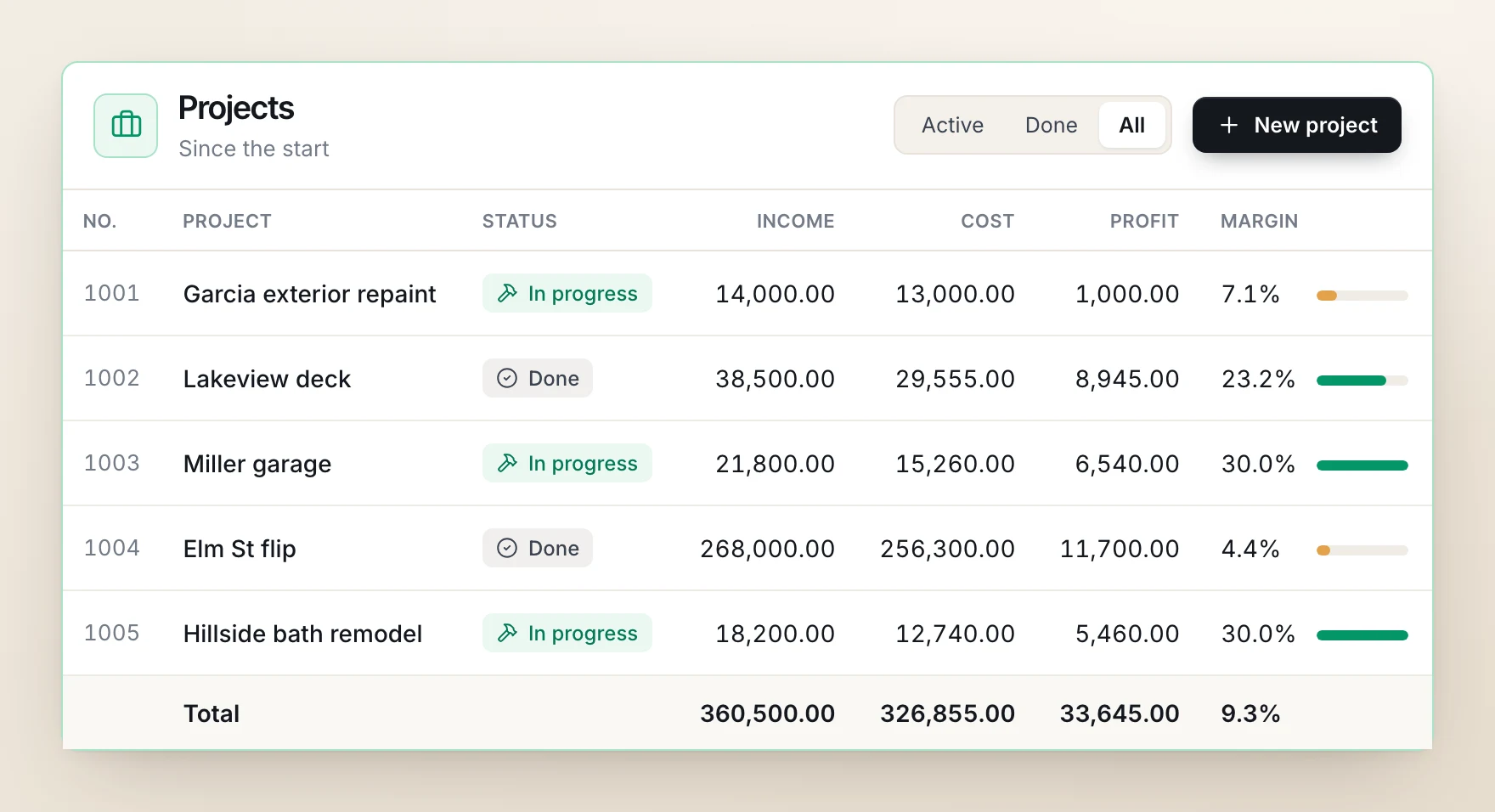
- See profit per job: the Projects page lists every job with its income, cost, profit and margin, on accrual or cash.
- Open a job to see its cost by type, click any figure down to the bill or invoice behind it, and export it to Excel or CSV.
Budgets, change orders and committed cost
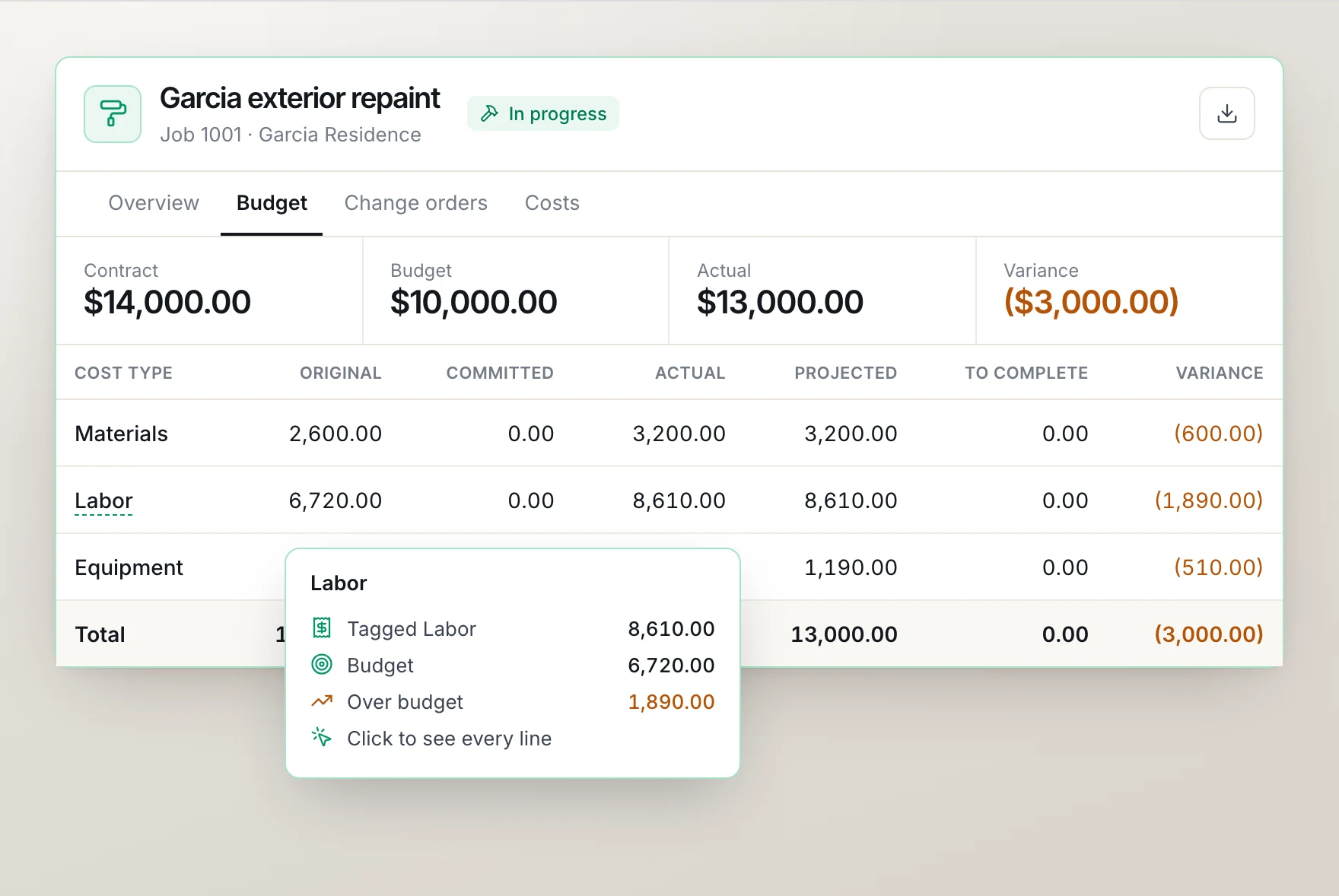
A job's Budget tab is the weekly check from step 5:
- The contract comes from the accepted estimate or is typed in, and the budget can also come from a spreadsheet.
- Each cost type shows its budget, what's committed on purchase orders and subcontracts, the actual cost and the variance.
- Change orders go to the customer as a link to sign. An approved one raises the contract and the budget together.
Hours on each job
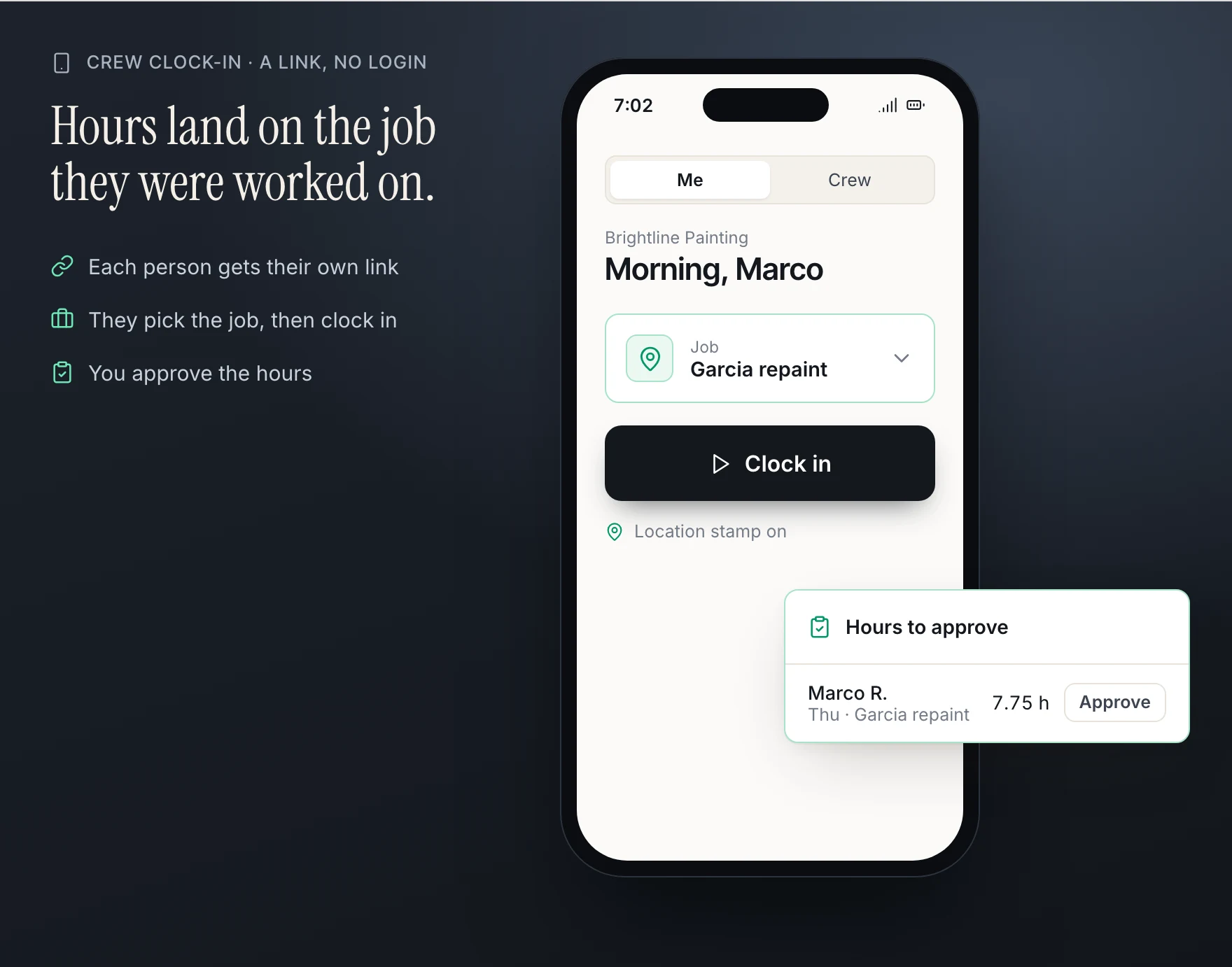
You type each person's week of hours per job, or crews clock in and out from a link on their phone, with no login, and you approve the clocked hours. Hours show on the job's page with an estimate of their cost, which stays out of its profit. To put job costs you pay on the customer's invoice, give the bill line the customer and a markup, then add those billable costs to their draft invoice.
Classes are on every plan. Projects, with budgets, change orders, timesheets and the phone clock, are part of the Business Max add-on, and the Practice and Firm plans include it. The step by step guides: Track job costs with Projects, Budget a job and Track income and expenses by class, location or property.
Where to start this week
- Pick the three jobs or properties you are least sure about.
- Write down, for each, what you expected it to make.
- Label every cost and sale for them since they started, including the receipts still in the truck.
- Compare. The one that surprises you is where your next price change, or your next hard conversation with a tenant, comes from.
Questions
What is the difference between job costing and class tracking?
Class tracking tags each transaction with a part of the business (a property, a crew, a location) so the profit and loss can show one column per class. Job costing goes further for work with a start and an end: a budget, the cost split by materials, labor and the rest, and a final profit when the job closes.
Should a landlord track each rental property separately?
Yes. The IRS asks for it: Schedule E reports each rental property's income and expenses in its own column, so books kept per property make that form a copy job instead of a sorting job.
How do I put my own labor on a job if I don't pay myself wages?
Track your hours on the job anyway. Even with no wage to post, the hours tell you what the job paid you per hour, which is the number to compare against your next bid.
What do I do with costs that cover several jobs, like a truck or insurance?
Leave them as overhead instead of guessing a split. Job profit tells you which work earns its keep; the overhead tells you how much all the jobs together have to earn.
When should I check a job's numbers?
Weekly while it runs, and once more when it closes. A weekly look catches an overrun while you can still change the order or talk to the customer; the closing look sets your price for the next one.
Sources
General information for US businesses, not tax or legal advice for your situation. Last updated .