The short answer
- Your .QBW file only opens in QuickBooks. The way out is your reports, exported to Excel.
- One report carries most of your books: the General Ledger, with Dates set to All, run on Accrual.
- Save your lists and a .QBB backup before you cancel. After that, Intuit gives you one year of view-only access.
- Intuit stopped selling new Pro and Premier subscriptions in Sept 2024. Pro Plus renewals now cost $1,351 a year.
QuickBooks Desktop is the one a lot of us learned on. It lives on your own computer, it opens fast, and the reports are exactly where your fingers expect them. Nobody asked for it to change.
Intuit is changing it anyway, one renewal notice at a time. "I have no idea how long Intuit will let me keep using this Desktop version," one longtime owner wrote to us this fall. Every road Intuit builds out of Desktop leads to QuickBooks Online.
This guide is the other road: how to get your books out of Desktop in a form any software can read, edition by edition, without losing the years behind them.

Is Intuit really pushing Desktop users to QuickBooks Online?
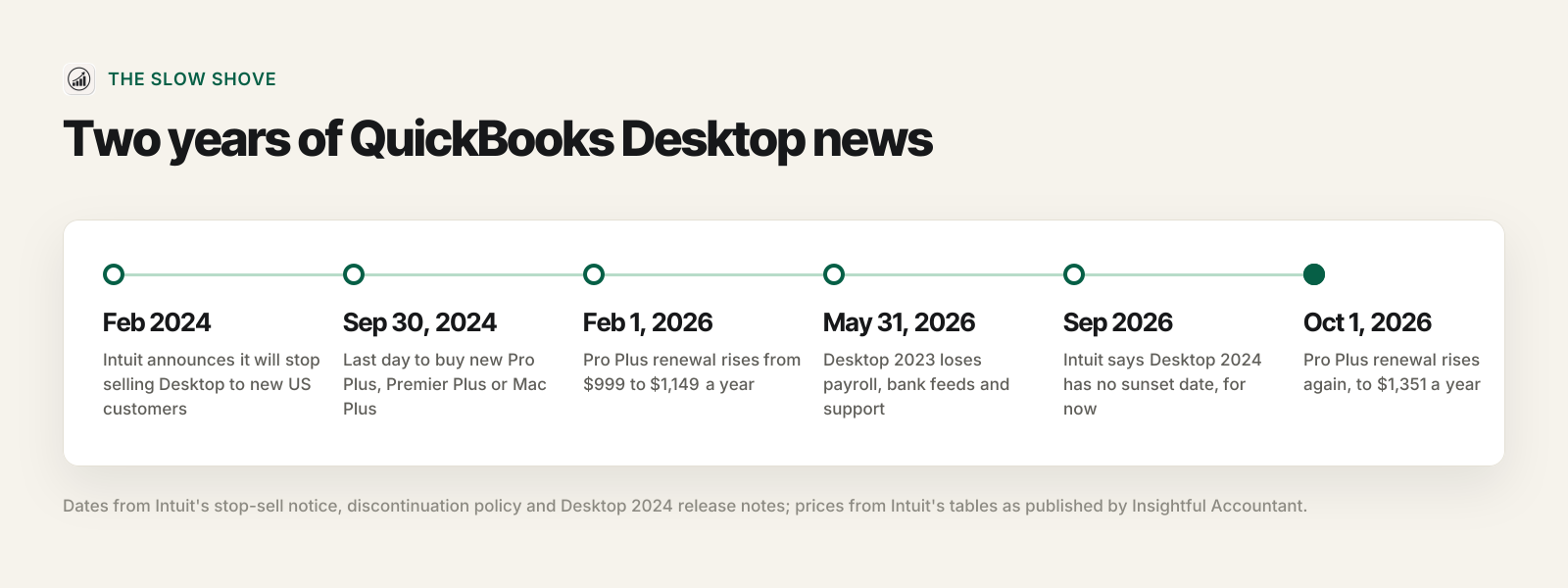
Look at the last two years and decide for yourself.
| Date | What happened |
|---|---|
| Sept 30, 2024 | Last day a new US customer could buy Pro Plus, Premier Plus, Mac Plus or Enhanced Payroll. Existing subscribers can renew. Enterprise is still sold. |
| Feb 1, 2026 | Pro Plus renewal rose from $999 to $1,149 a year. |
| May 31, 2026 | Desktop 2023 lost payroll, bank feeds, payments, emailing forms, security updates and support. |
| Sept 18, 2026 | Intuit's Desktop 2024 page, updated that day, says Pro Plus, Premier Plus and Enterprise 2024 "won't be discontinued in May 2027" and have "no sunset deadline". |
| Oct 1, 2026 | Pro Plus renewal rose again, to $1,351 a year. Premier Plus went to $1,891. |
To be fair to Intuit, the September promise is real: if you are on Desktop 2024 and happy, you can stay. But a product nobody new can buy, at a price up 35% in one year, has one direction of travel. Intuit's own Desktop page now offers existing Desktop customers 50% off a year of QuickBooks Online. Our Desktop status post has the full price table.
So whatever you decide, do one thing now: get your data into files you control.
Why can't you just upload your QuickBooks company file?
Because a company file is not a document. It is a database in a format only QuickBooks reads. Intuit's own list of Desktop file types says what each one is:
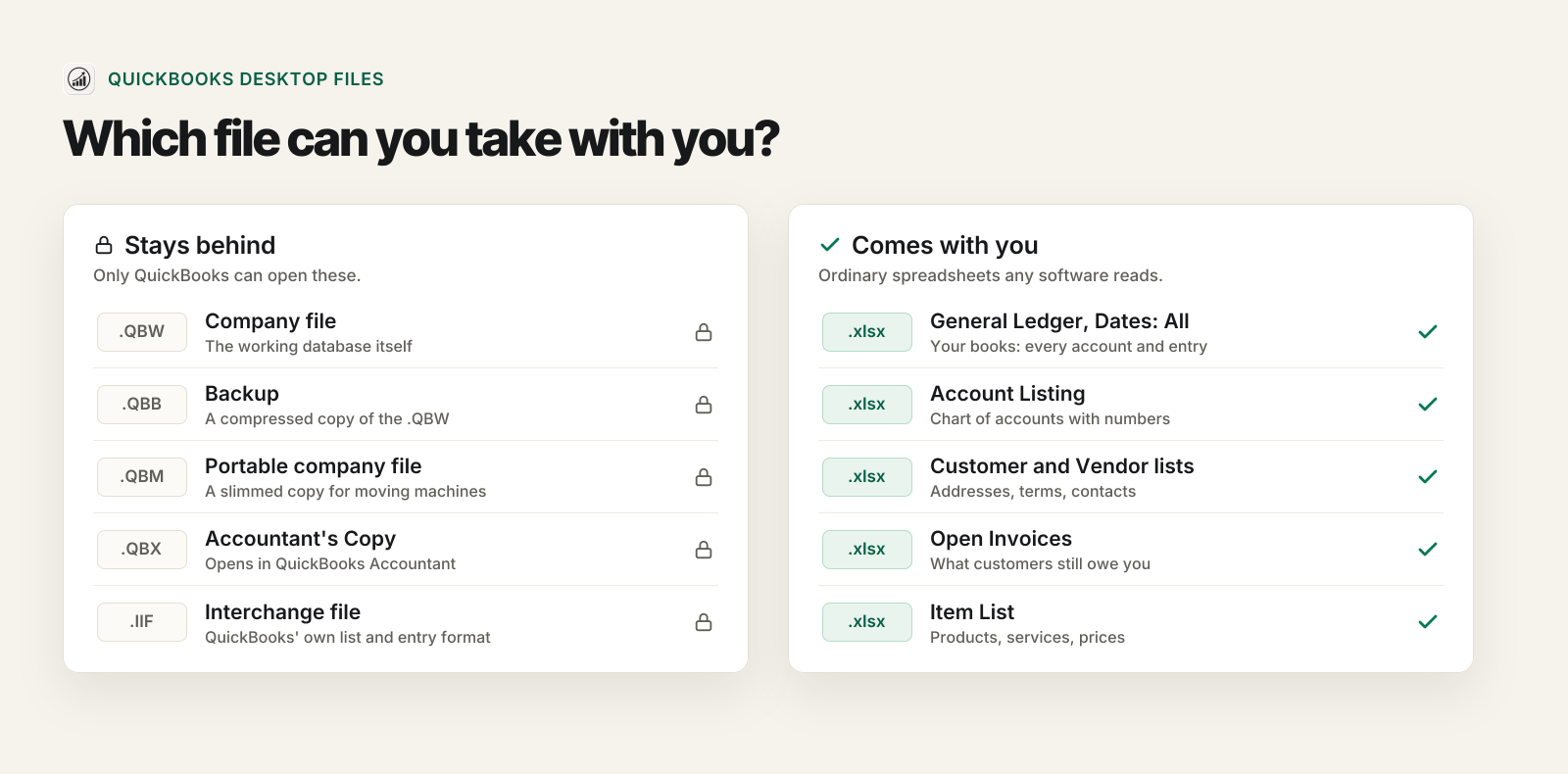
- .QBW is the company file itself. .QBB is a backup of it, .QBM a portable copy, and .QBX the copy you send an accountant.
- .IIF looks promising, since it is plain text. It is not your books: Intuit's page on IIF says it moves lists, and "you can import transactions but you can't export them".
- .QBO trips up more people than any other. It sounds like "QuickBooks Online" and it is not: Intuit calls it a bank statement file, the download from your bank's website. One account's bank activity, nothing more.
The only tool that reads a .QBW directly is Intuit's migration tool, and it only goes one place: QuickBooks Online. It also replaces everything already in that Online company and refuses files over 4,000,000 "targets".
Don't fret. QuickBooks Desktop has always been generous with reports, and a report exported to Excel is a file every accounting system on earth can read. That is the way out.
Which QuickBooks Desktop edition do you have?
Press F2 in QuickBooks for Windows and the Product Information window shows your edition and year. On a Mac, open QuickBooks > About QuickBooks. The good news: the export is nearly the same everywhere.
| Edition | Still sold to new US customers? | How the export works |
|---|---|---|
| Pro / Pro Plus | No (since Sept 30, 2024) | Reports menu, Excel button. The standard path below. |
| Premier / Premier Plus (Contractor, Manufacturing & Wholesale, Nonprofit, Professional Services, Retail) | No | Same as Pro. Industry editions share one Reports menu. |
| Accountant | Renewals and ProAdvisor bundles | Same as Pro. Export from the client's file, not your own. |
| Enterprise (Silver, Gold, Platinum, Diamond) | Yes | Same report and Excel button. Bigger files, so plan on yearly exports. |
| Mac Plus | No | Open the report, Export, then File > Save As. Opens in Numbers or Excel 2016 and later. |
| An old one-time license (2021 or earlier) | No | If it still opens, its reports still export. Intuit's online services for it ended years ago. |
What do you actually need to export?
People ask us for a list: the general ledger, the chart of accounts, invoices, bills, customers, vendors, items, payroll. Here is the secret. Almost all of it rides inside one report.
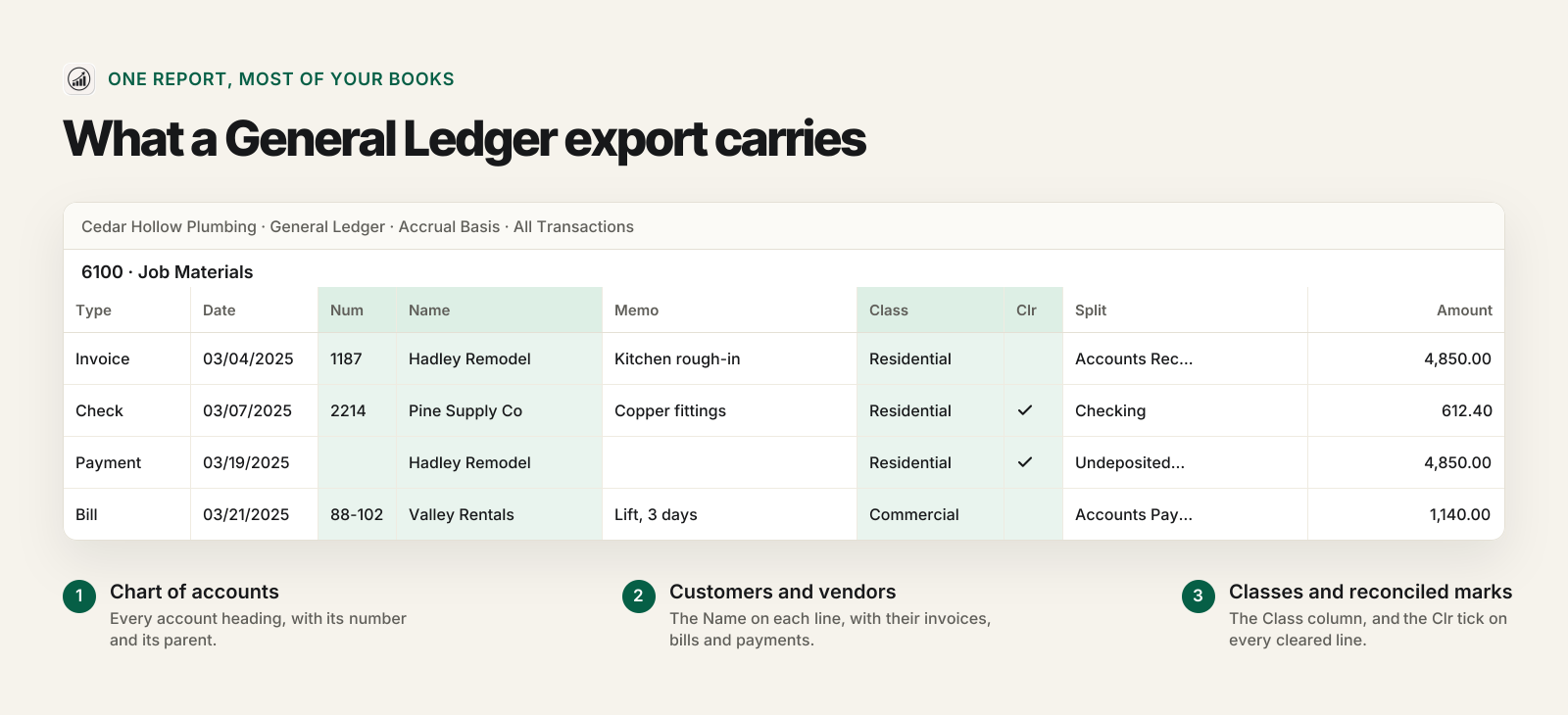
The General Ledger lists every account and every transaction in it. Each line carries the date, the type (invoice, bill, check, payment), the number, the customer or vendor, the memo, the class, the reconciled mark and the account on the other side. Read that list again: that is your chart of accounts, your invoice and bill history, your customers and vendors, and your class reports, all in one file.
| You want to bring | Where it lives | What to export |
|---|---|---|
| Chart of accounts | Every account heading in the General Ledger, numbers and parents included | Nothing extra. Keep the Account Listing for your archive. |
| Every transaction, all years | The General Ledger | General Ledger, Dates: All |
| Customer and vendor history | The Name on each ledger line | Nothing extra |
| Addresses, emails, terms | The lists | Customer and Vendor lists, from each Center's Excel button |
| Products and services | The Item List | Lists > Item List > Excel > Export all Items |
| Who owes you, who you owe | A/R and A/P balances in the ledger | Open Invoices and Unpaid Bills Detail on your last Desktop day |
| Payroll detail, attachments, form templates | The company file only | Payroll summaries and the files themselves, saved for your archive |
How do you export the General Ledger the right way?
Five settings decide whether the file comes across whole. In QuickBooks Desktop for Windows:
- Open Reports > Accountant & Taxes > General Ledger.
- Set Dates to All.
- Click Customize Report. Check that Accounting method is Accrual, and add the Class column (and Location, if you use it).
- Click Excel > Create New Worksheet. Before you click Export, open Advanced and set Printing options to On printed report and screen. That keeps the report's header, with its "Accrual Basis" line, at the top of the file.
- Save it as an .xlsx workbook. No Excel on that computer? A CSV works too, as long as nobody opens it and saves it again.
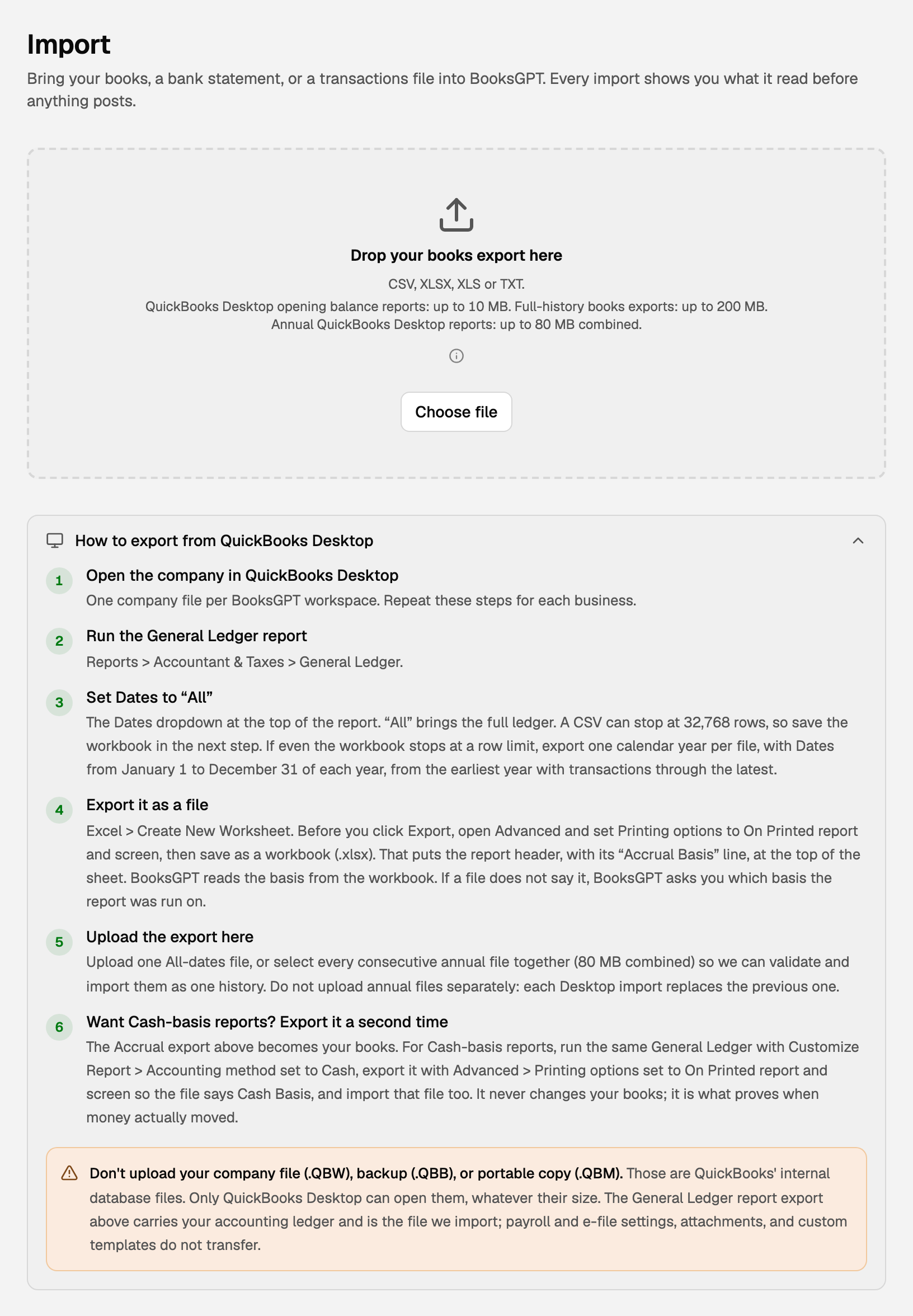
Is your history too big for one file? Old versions of Excel stop at 65,536 lines, and we have seen Desktop CSV exports stop at exactly 32,768 rows. If yours runs long, export one calendar year per file, January 1 to December 31, from the first year with transactions to the last. You will bring them in together. Yearly files are also the cleanest way to get each old year's profit and loss back exactly as QuickBooks printed it.
Do not edit the export. Deleting heading rows or totals to "tidy it up" removes the very structure that proves each account adds up.
What else should you save before you cancel?
Think of this as packing the filing cabinet before the movers take the building.

- A .QBB backup. File > Back Up Company. Nothing but QuickBooks opens it, but it is the complete record, and it costs nothing to keep two copies.
- Your lists. Customers and vendors from their Centers, items from the Item List, each with the Excel button.
- What is open on your last day. Open Invoices and Unpaid Bills Detail, dated your last day in Desktop.
- Year-end reports for every year you keep. Balance Sheet, Profit and Loss and Trial Balance, as PDF and Excel. Add payroll summaries, 1099 totals and sales tax reports.
Mind the clock. When a Desktop subscription ends, Intuit keeps the company file readable in view-only mode for one year: an admin can open it and run reports, alone, not in multi-user mode. Mac Plus 2023 and older get no view-only year at all. Export while you still have a working copy.
What mistakes break a Desktop export?
The same handful, over and over:
- Running the report on Cash. This is the big one in our support inbox. A Cash General Ledger leaves out unpaid invoices and bills, so your A/R and A/P vanish. Run it on Accrual even if you keep cash books: Cash reports are built from the same Accrual ledger afterward.
- Forgetting the Class column. Classes cannot be rebuilt from a ledger that never printed them. Every report by property, crew or job would collapse into one column.
- Uploading the years one at a time. Each Desktop import replaces the one before, so 2019, then 2020, leaves you with 2020. Select every yearly file together.
- Connecting the bank or reconciling before the import. The feed's rows and the ledger's rows describe the same money, and a finished reconciliation can block a corrected re-import. Import the history first, check it, then connect and reconcile.
- Re-entering open invoices. The ledger already holds what each customer owes. One business we helped typed its open invoices in again and doubled $45,175.50 of receivables.
- Choosing "opening balances only" by accident. A one-date balance report starts you fresh with no history, and adding the history later means starting the workspace over. Decide before you import.
What does a clean Desktop move look like?
A glass and door fabricator came to us with almost ten years of Desktop history, January 2017 to November 2026. QuickBooks would not export it as one file, so the owner exported ten yearly General Ledger CSVs and selected them together.
| What we checked | Result |
|---|---|
| Ledger rows read from the ten files | 27,430 of 27,430 |
| Journal entries created | 10,175 |
| Debits and credits | $15,274,935.01 on each side |
| Left in suspense | $0.00 |
| 2017 net income, QuickBooks and imported | $266,685.76 and $266,685.76 |
The 2017 profit and loss matched line for line: income $486,692.04, cost of goods sold $94,450.85, expenses $125,555.43. That is the bar. Not "the import finished", but the same report, the same year, the same number.
How do you bring a Desktop export into BooksGPT?
Open the Import page (or drop the file into the Copilot chat) and drop the workbook, or all of your yearly files at once (up to 50 files and 80 MB together). Before anything posts, the import checks that debits equal credits, compares every account with the report's own totals, and shows how each account will be typed so you can fix one that looks wrong. Then you click Import N accounts.
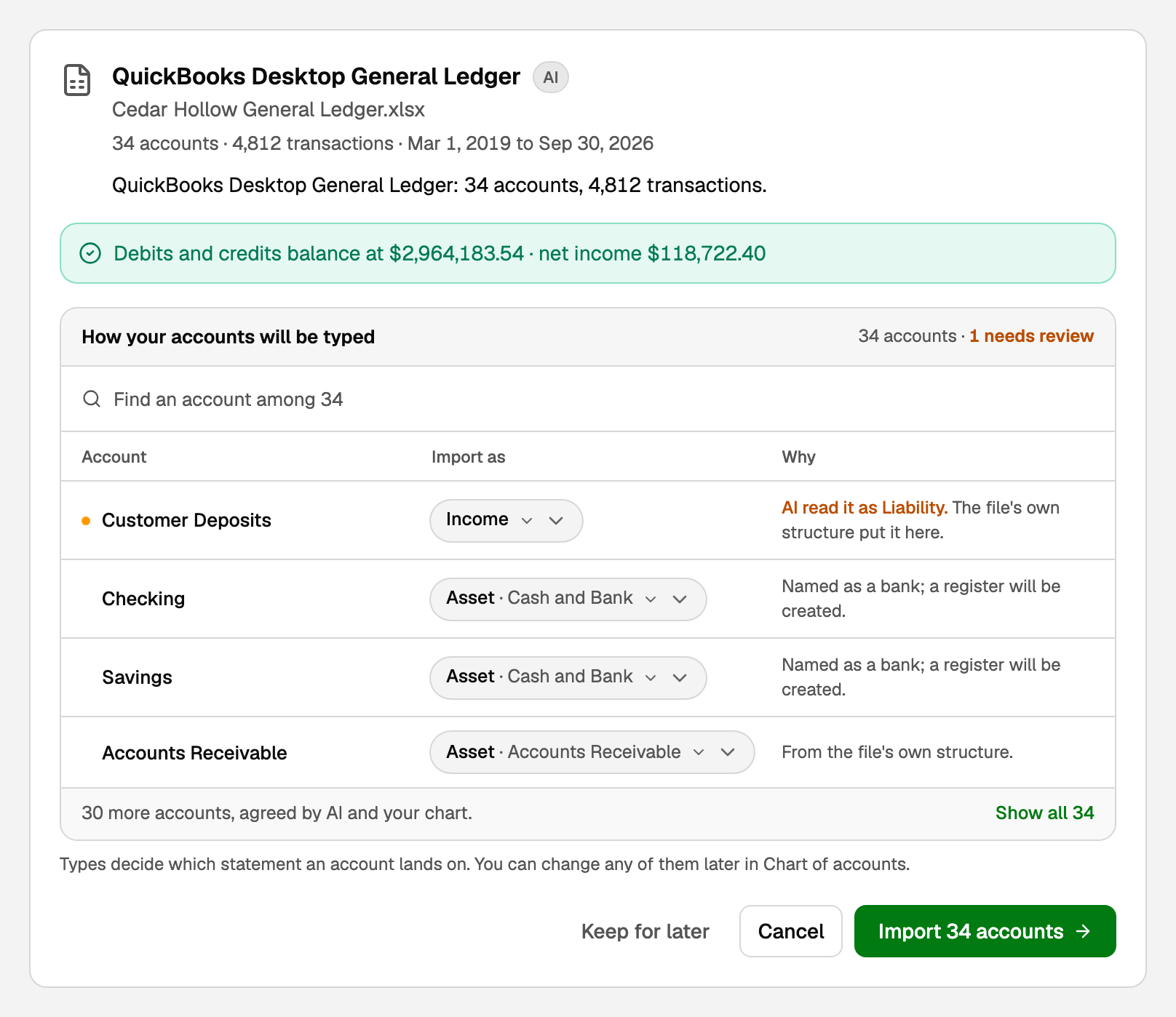
What comes across from the General Ledger:
- The chart of accounts, nested up to five levels, including accounts that never had a transaction.
- Every transaction with its date, memo and check number.
- Customers and vendors, created from the names on A/R lines and payees.
- Classes and locations, as dimensions your reports can group by.
- Reconciled marks from the Clr column, so old cleared items do not look outstanding.
Bring the details in the same afternoon: Vendors > Import takes a Desktop vendor list, Products & stock > Import products takes the Item List, and support loads a Customer & Job List for you, since there is no customer upload button yet. Payroll, attachments, e-file settings and form templates stay with your archive. Step by step: Import from QuickBooks Desktop.
Then do the only check that matters. Open the Balance Sheet on your last Desktop day, open the same report in QuickBooks, and compare them line by line. When they match, you are moved.
What should you do this week?
- Press F2 and write down your edition, year and renewal date.
- Back up the company file to a .QBB, twice.
- Export the General Ledger: Accrual, Dates All, Class column, Excel workbook. One file per year if it runs long.
- Export the customer, vendor and item lists, Open Invoices and Unpaid Bills Detail.
- Save each year's Balance Sheet, Profit and Loss and Trial Balance as PDF.
- Import, compare the Balance Sheet, and only then let the renewal lapse.
Questions
Can I open a .QBW or .QBB file in any other accounting software?
No. Intuit's own file list describes them as the company file and its backup, and only QuickBooks opens them. The one tool that reads them directly is Intuit's migration tool, and it only moves them into QuickBooks Online. Every other route goes through exported reports.
What is a .QBO file? Is that my QuickBooks Online data?
No. Intuit calls a .QBO file a bank statement file: transactions downloaded from your bank's website for Web Connect. It holds one account's bank activity, not your books.
Do I have to move to QuickBooks Online?
No. Existing Desktop subscribers can keep renewing, Intuit says Desktop 2024 Pro Plus, Premier Plus and Enterprise have no sunset date, and Enterprise is still sold. You can also export your books and move to other software. What you cannot do any more is buy a new Pro Plus, Premier Plus or Mac Plus subscription in the US.
Can I still export my data after my Desktop subscription ends?
For a while. Intuit keeps a lapsed company file in view-only mode for one year (Windows 2023 R3 and newer, Mac Plus 2024 and newer): an admin can open it and run reports, but not record anything. Intuit's own advice is to export before you cancel, and that is the safe order.
Will my invoices and bills come across?
Their money does. Every invoice, payment and bill is a line in the General Ledger, with the customer or vendor named on it, so your A/R and A/P balances and each customer's history arrive with the ledger. The open documents themselves stay a list: keep the Open Invoices and Unpaid Bills reports to collect and pay from, and do not re-enter them as new invoices.
Can I export from QuickBooks Desktop for Mac?
Yes. Open the report, choose Export, then File > Save As. Intuit says the file opens in Numbers 3.5 or Excel 2016 and later. Mac exports sometimes leave the Total rows blank, so compare the Balance Sheet in both systems after the import.
My General Ledger is too big for one file. What do I do?
Export one calendar year per file, January 1 to December 31, from your first year through your last, and select all of the yearly files together when you import. Uploading them one at a time replaces each year with the next.
Sources
- Learn what the QuickBooks Desktop stop-sell means for your business, Intuit, October 16, 2026
- QuickBooks Desktop 2023 service discontinuation policy, Intuit, August 5, 2026
- What's new in QuickBooks Desktop 2024, Intuit, September 18, 2026
- Breaking News: Intuit Announces Desktop Pricing Changes for Fall 2026, Insightful Accountant, July 14, 2026
- File extensions used in QuickBooks Desktop, Intuit
- Export reports as Excel workbooks in QuickBooks Desktop, Intuit, August 3, 2026
- Import and export CSV files in QuickBooks Desktop, Intuit, August 4, 2026
- Export, import, and edit IIF files, Intuit, August 4, 2026
- Renew your subscription or use view mode in QuickBooks Desktop, Intuit, August 5, 2026
- Move from QuickBooks Desktop to QuickBooks Online, Intuit, August 5, 2026
- Toggle to another edition of QuickBooks Desktop, Intuit, August 3, 2026
General information for US businesses, not tax or legal advice for your situation. Last updated .